
On-device Storage

Face ID Protection

No Account Setup
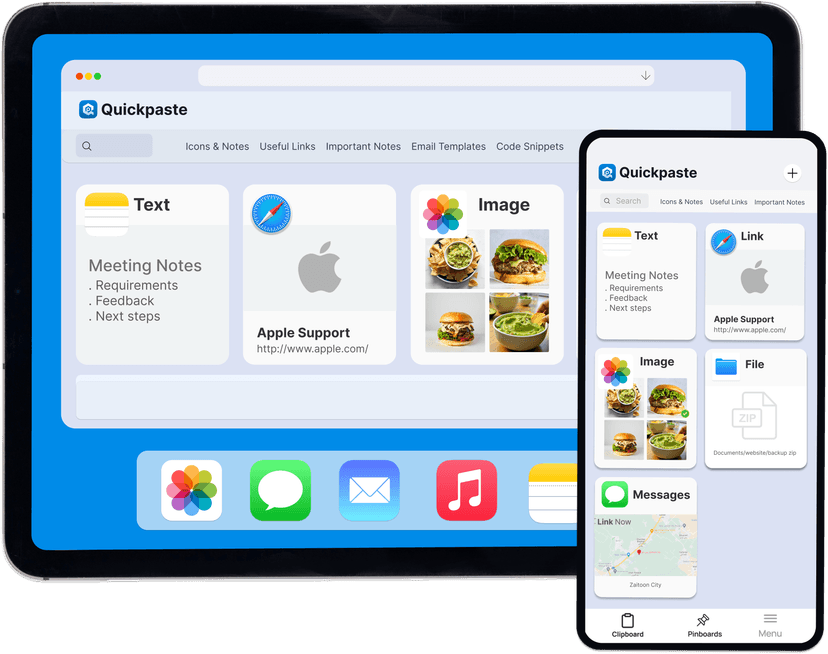
Clipboard Tool for iOS
Quick Paste - Clipboard Manager is designed to help iPhone users save and reuse copied text, images, and links with structured clipboard history and pasteboard management features. It adds fast paste access through a keyboard extension and keeps saved clipboard items stored locally with optional Face ID protection.
Why iPhone Needs a Clipboard Manager?
By default, iOS only keeps your most recent copied item. When you copy something new, the previous content is lost.
The Solution
Copy multiple messages or replies without losing them
Save links and references
Reuse templates and repeated text
Switch between apps while working
A clipboard manager solves this by keeping a searchable clipboard history.
Features Clipboard Manager
Everything you copy can be saved, organised, and pasted again when needed.
Reuse saved clipboard items across iPhone apps
Store multiple content types in one clipboard list
Paste saved items directly from the iOS keyboard
Organise frequently used copied content
Protect clipboard history with Face lock
Clipboard data never leaves your device
Fast, responsive, and free of cost
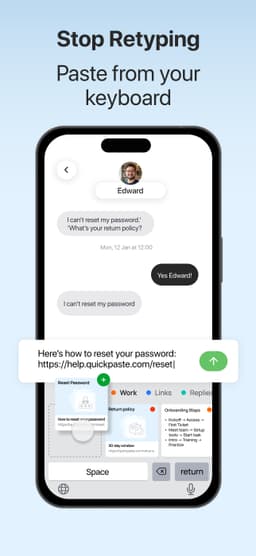
How Clipboard Manager Works?
Instead of copying the same content repeatedly, users can store and reuse it with one tap. See how
Enable Action Extension for Limitless Copying
Turn on the Quick Paste Action Extension to save anything instantly. Select any text or image → tap Share → choose Copy to Quick Paste.
Use the Paste Keyboard Anywhere
While typing, long-press the language switch key → select Quick Paste → view saved clips → tap any item to paste instantly.
Why Choose Quick Paste?
Features | quick paste | default ios clipboard | other apps |
|---|---|---|---|
| clipboard history list | |||
| saves multiple copied list | |||
| supports text and images | Last Item Only | ||
| reuse save clipboard itens | |||
| paste without switching apps | |||
| face id lock for clipboard data | |||
| no account required | |||
| no mandatory cloud sync | |||
| private focused clipboard storage | basic | ||
| light weight clipboard utility | ___ |
Reviews
Ajimu
Jan 8, 2026
"Client Pro exceeded our expectations with its ease of use and powerful features. Perfect for anyone looking to create high-quality landing pages."
FAQs
A clipboard manager is an app that saves copied items and provides clipboard history so users can paste previous content again.
Not by default. A clipboard manager app adds clipboard history to iOS.
Using a clipboard manager app that stores copied text and lets you reuse it later.
Yes. Advanced clipboard managers can store text, images, and links.
In privacy‑focused clipboard managers, data is stored locally and can be protected with Face ID.
You can view copy-paste history by using a clipboard manager app that stores copied content and shows it in a list.
Yes, saved clipboard items can be reused across supported apps using paste features and keyboard extensions.
It captures copied content based on app permissions and supported methods, not system-level interception.
Upgrade Your iPhone Clipboard
Install a dedicated clipboard manager and stop losing copied content.